Purchase Your Course Extension
Purchase Extensions in Your LMS
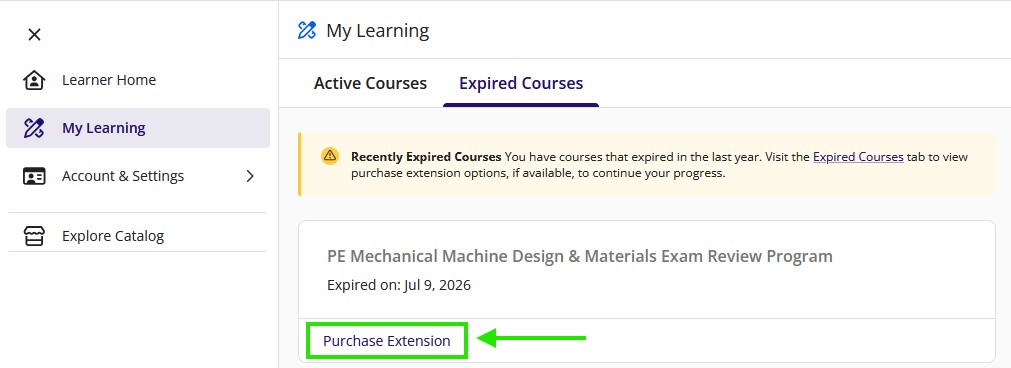
You can order an extension directly on your "My Learning" dashboard. Click the “Purchase Extension” link associated with your enrollment from the "My Learning" page (see image below). Please review the online extension terms and conditions below before ordering.
Where to Find the Purchase Option on Your Dashboard:
Important Information About Your Extension
Please review the online extension terms and conditions before ordering.
- Course extensions apply to both OnDemand and Live Online courses. They are the same price.
- Live Online course extensions apply to the online materials only. Live Online course extensions do not grant extended instructor access.
- 30-day Course extension price only valid for Live Online customers or 3-month or greater OnDemand customers.
- For PE Nuclear, CA Seismic, and CA Surveying extensions, or if you cannot find your extension, please contact customer support.
- If your course or learning hub program has not yet expired, you can pre-purchase an extension above. The effective date will be based on the day that your course will expire.
- You can request an extension any time during your active purchase. If your access is expired, you can request an extension up to 15 months after the original start date of your access.
- The total access duration for a program, including all extensions, cannot exceed 24 months from the original start date.
- Pre-purchased extensions are non-refundable, and restrictions apply.
- Not all companies that have partnered with Kaplan allow extensions to your education materials. If you are unsure if you qualify for an online extension based on your company's policy, contact your administrator to confirm before purchasing.